


- Gift Vouchers/e-Pay are ACCEPTED at Listed Outlets and website.
- Gift Vouchers once converted to e-Pay CAN only be used on the Woodland website.
- Gift Vouchers/e-Pay CAN be used during the sale.
- Gift Voucher CAN be used multiple times once converted to e-Pay balance.
- Multiple Gift Vouchers CAN be combined & added to e-Pay balance.
Gear up for the outdoors with Woodland, featuring durable footwear and rugged apparel built for tough conditions. Whether you are planning an adventure or seeking sturdy everyday shoes, rely on long-lasting performance. Get your Woodland Gift Vouchers today and step out with dependable gear.
1. This is a Woodland Gift Voucher (GV)/e-Pay and can be redeemed for any product on the listed stores and at woodlandworldwide.com.
2. The person with GV/e-Pay is deemed the beneficiary.
3. Once the Gift Vouchers are added to the e-Pay balance, they cannot be used in retail stores.
4. The GV/e-Pay cannot be revalidated once it expires.
5. The GV can be converted into e-Pay and used partially at the holder's convenience.
6. GV/e-Pay is non-refundable and cannot be exchanged, transferred, resold, or redeemed for cash.
7. Multiple GVs can be combined and added to the e-Pay balance.
8. No Credit note/refund for the unused amount of the GV/e-pay will be given.
9. The GV/e-Pay can be used with ongoing sales.
10. Woodland/GyFTR is not responsible for lost, damaged, or stolen GV/e-Pay.
11. If a GV/e-pay gets blocked due to a technical issue, it will be reactivated in 72 hours.
12. Any dispute should be referred to the company, and the company's decision shall be final.
13. GV/e-Pay has been issued subject to the terms of the company.
14. Woodland makes every effort to accept GV/e-Pay, but due to technical or administrative reasons, an outlet may refuse to accept it.
15. Only the listed Woodland outlets will accept the GV at their sole discretion. Woodland may add or remove an outlet without prior notice.
16. For any queries/issues related to GV / GC, raise a request at www.gvhelpdesk.com or care@woodlandworldwide.com or call 18001033445.
Step 1
Login to the woodland website.

Step 2
Add the product to the cart.

Step 3
Use the GyFTR EPAY option to use the voucher.
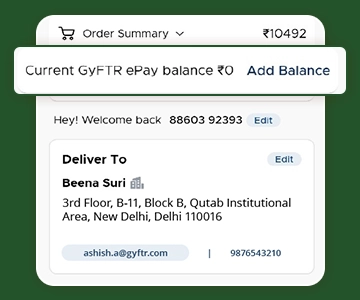
Step 4
Use the outlet locator, select your product, share the Gift Voucher at billing, and pay any balance if needed.


Company Name : Sarvpay Online Private Limited
.
Quick Read
Easy Guide
© 2025 copyright. All rights reserved.