


- Gift Vouchers/e-Pay CAN be used on the MakeMyTrip website and app.
- Gift Vouchers/e-Pay CAN be used to book Holiday Packages only.
- Gift Vouchers/e-Pay CANNOT be used for Flights, Hotels, Buses, Trains, Cabs, Tours & Attractions, Visa, Cruise, Forex Card & Currency, and Travel Insurance.
- Gift Vouchers/e-Pay CANNOT be clubbed with offers.
- A maximum of 3 Gift Vouchers CAN be used in 1 booking.
Organize complete vacation packages with MakeMyTrip Holiday, offering structured itineraries and comprehensive travel plans. Whether you are booking a short weekend getaway or coordinating a long family vacation, utilize reliable and pre-planned travel solutions. Get your MakeMyTrip Holiday e-Pay Gift Cards today and secure your travel itineraries.
1. This is a MakeMyTrip Holiday GV (Gift Voucher)/e-Pay that will be accepted on the MakeMyTrip mobile app and on the website at www.makemytrip.com for Make My Trip Holidays bookings only.
2. The person who has the GV/e-Pay is deemed to be the beneficiary.
3. To check GV/e-Pay balance & validity, please log on to https://www.makemytrip.com/gift-cards/.
4. The GV can be converted into e-Pay as per the holder's convenience.
5. The e-Pay balance must be linked to the registered mobile number.
6. GV/e-Pay is valid for partial redemption. The balance would remain in the GV/e-Pay till the validity period, and can be reused for multiple transactions.
7. A Maximum of 3 GV/e-Pay can be combined and used in 1 booking.
8. Products and services are subject to availability.
9. This GV/e-Pay cannot be redeemed offline for Flights and Hotels.
10. The GV/e-Pay is not valid on Flights, Hotels, Buses, Trains, Cabs, Tours & Attractions, Visa, Cruise, Forex Card & Currency, and Travel Insurance.
11. This GV/e-Pay is not applicable to the Pay Later Payment option.
12. GV/e-Pay cannot be clubbed with any other ongoing offer, discount/cash back/promotion run by makemytrip.com on the app or website.
13. The GV/e-Pay balance cannot be transferred to another e-Pay account, exchanged for cash, or converted into any other form of currency.
14. The GV/e-Pay CANNOT be revalidated once expired or cancelled under any circumstances.
15. MakeMyTrip is not responsible if the GV/e-Pay is lost, stolen, or used without permission.
16. If GV/e-Pay gets blocked on account of a technical issue, it will be enabled in 72 hours.
17. Any dispute should be referred to the company from which the GV/e-Pay has been received, and the company's decision shall be final.
18. MakeMyTrip/GyFTR reserves the right to withdraw, modify, cancel, or change the offer at any point without prior notice and at its sole discretion.
19. In case of cancellation of bookings made using the GV/e-Pay within the validity period, the amount will be reversed to the same GV/e-Pay as used at the time of booking.
20. Users are required to save the GV/e-Pay number to utilize this refunded amount, as we will not be able to reissue a new GV/e-Pay number.
21. In case of cancellations where the GV/e-Pay validity has expired, no refund will be processed for the amount paid by the GV/e-Pay.
22. In case of transaction failures, after GV/e-Pay is applied, the amount will be automatically refunded to the same GV/e-Pay within 24 hours.
23. MakeMyTrip and Gyftr are the final authorities on the interpretation of these rules.
24. MakeMyTrip reserves the right to deny accepting any GV/e-Pay if it suspects that cards are duplicated.
25. In no event, the liability of MakeMyTrip for any claims shall exceed the GV/e-Pay value.
26. In the event of any dispute, the parties agree to the exclusive jurisdiction of the courts of New Delhi.
27. This is for individual use only. Travel agents found using the GV/e-Pay would lead to cancellation of the booking, and no refund would be made.
28. For any issue or query regarding GV/e-Pay, please write to giftvouchers@makemytrip.com or www.gvhelpdesk.com
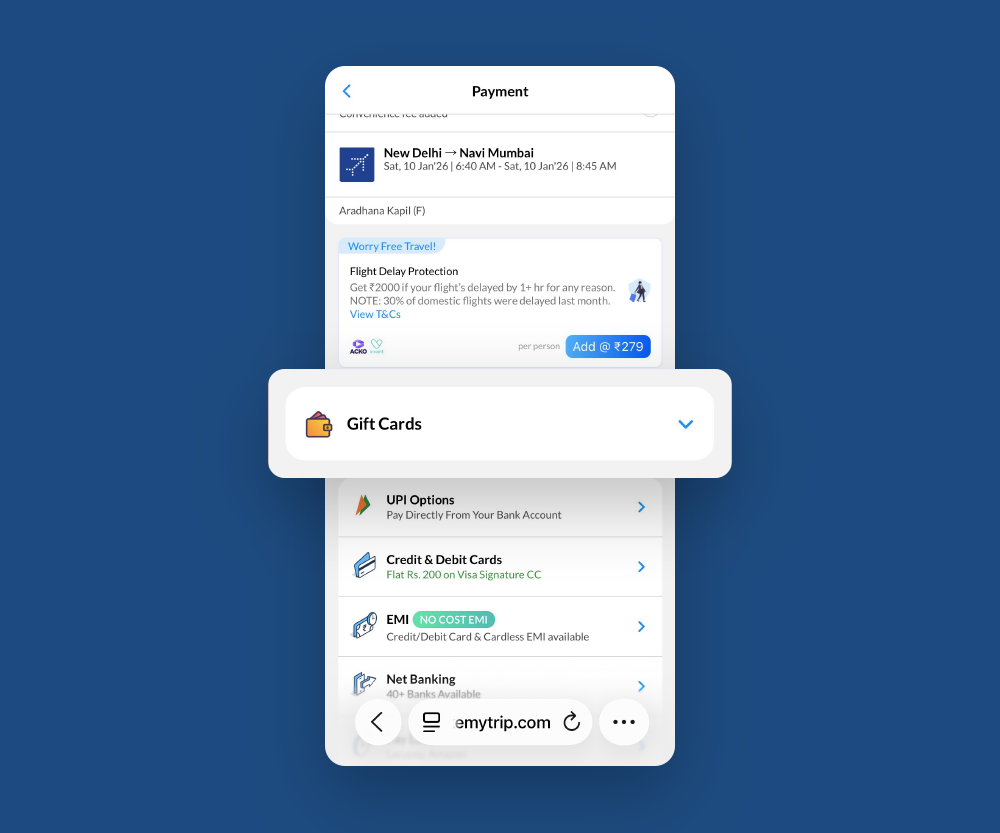
Step 1
Visit the MakeMyTrip website or app, select your preferred Holiday Package, complete the booking details, and proceed to the Payment Page. Tap <b>Gift Cards</b> to redeem.
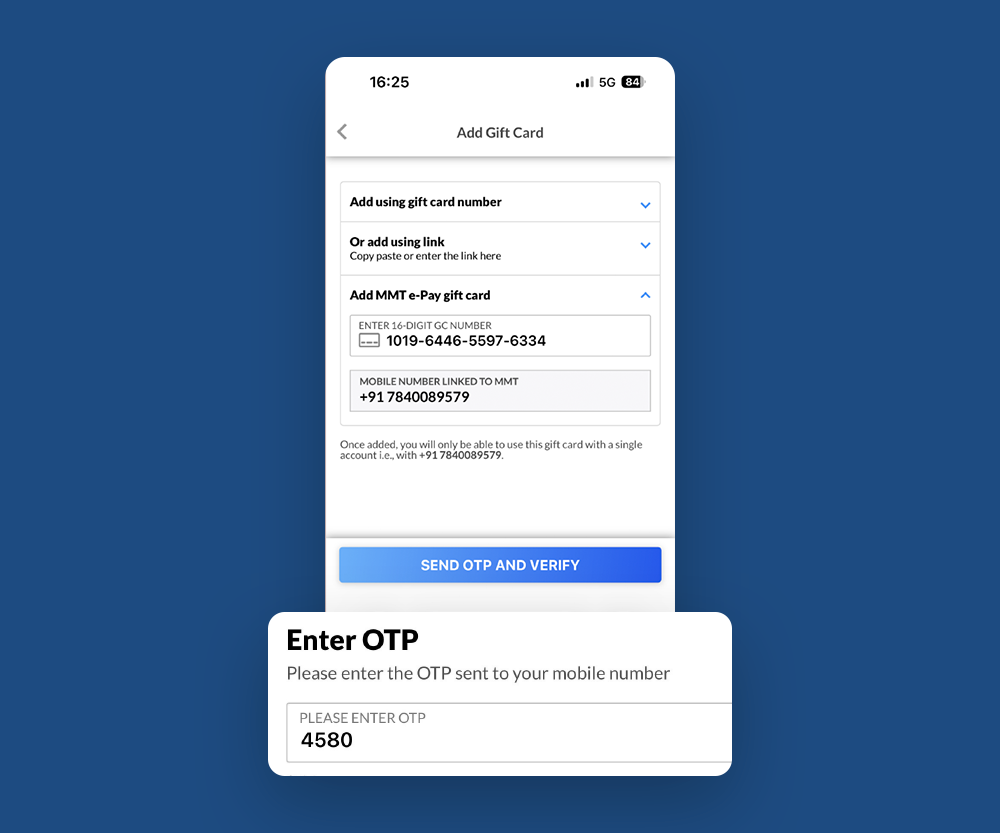
Step 2
In the Gift Cards section, tap <b>Add MMT e-Pay Gift Card.</b> Enter the registered mobile number and 16-digit Gift Voucher code, then tap <b>Send OTP & Verify. </b>Enter the OTP and select <b>Verify & Add Card.</b>
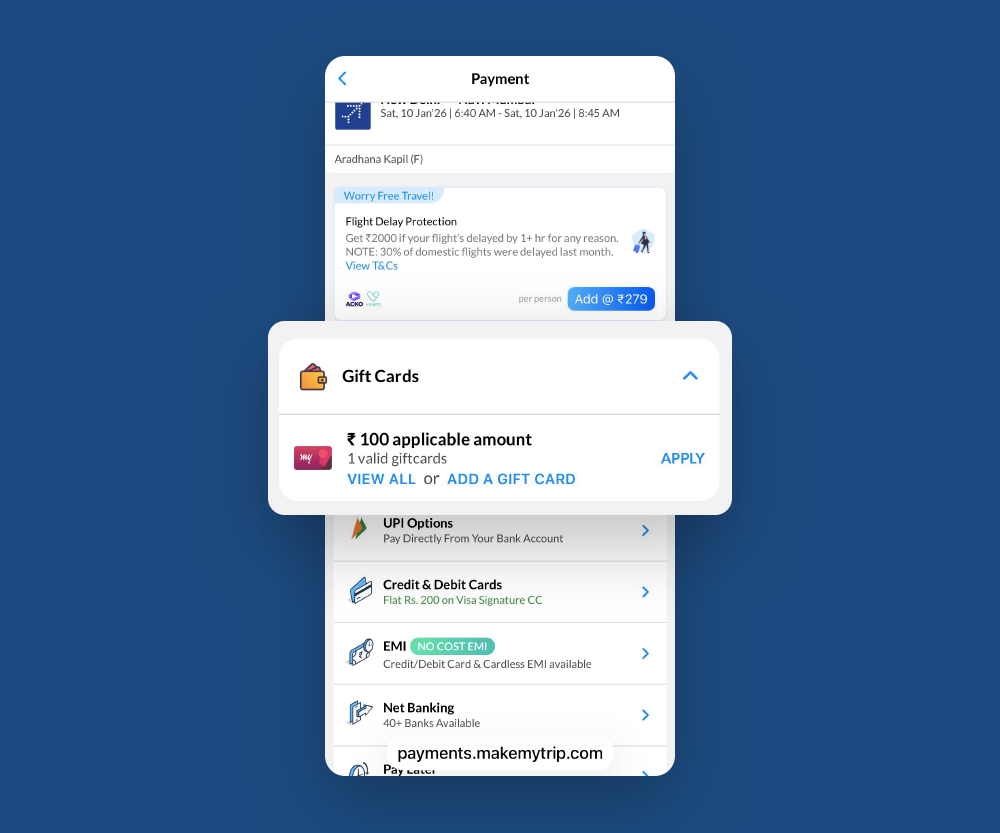
Step 3
Once verified, the Gift Voucher/e-Pay amount will be applied and deducted from the total bill. Pay the remaining balance, if any, using another payment method.

Company Name : Sarvpay Online Private Limited
.
Quick Read
Easy Guide
© 2025 copyright. All rights reserved.