


- The GV/GC CAN be used Online at campussutra.com
- Multiple Gift Vouchers CAN be combined & added to the e-Pay balance.
- The GV/GC CAN be clubbed with ongoing sales.
Campus Sutra is one of India's largest D2C brands and a trendsetter in the country's apparel industry. Campus Sutra Gift Cards from GyFTR offer a seamless shopping experience with access to a wide range of stylish and trendy apparel. Shop your favorite casual wear, party outfits, work attire, and sporty clothing at unbeatable prices using the Campus Sutra Gift Cards from GyFTR.
1. This is a Campus Sutra GV(Gift Voucher)/e-Pay, and it can be redeemed only at campussutra.com.
2. The person who has the GV/e-Pay is deemed to be the beneficiary.
3. The GV/e-Pay can be clubbed with the existing offers.
4. The GV can be converted into e-Pay as per convenience of the holder.
5. The GV/e-Pay balance cannot be transferred to another e-Pay account, exchanged for cash, or any other form of currency.
6. The e-Pay balance must be linked to the registered mobile number.
7. After conversion into e-Pay balance, this GV is valid for partial redemption. The balance would remain in the e-Pay balance and can be used for multiple transactions within the validity period.
8. The Campus Sutra GV/GC can be used for all purchases of products and services at the Campus Sutra Website.
9. Only valid Campus Sutra GV/GC at the sole discretion of Campus Sutra, shall be accepted for redemption.
10. The GV/e-Pay CANNOT be revalidated once expired or canceled under any circumstances.
11. Campus Sutra makes full efforts to accept Campus Sutra GV/e-Pay but technical or administrative reasons may lead to a website refusing to accept e-Pay.
12. Campus Sutra/GyFTR is not responsible if the GV/e-Pay is lost, stolen, or used without permission.
13. If GV/e-Pay gets blocked on account of a technical issue, it will be enabled in 72 hours.
14. Any dispute should be referred to the company from which the Campus Sutra GV/GC has been received, and the company's decision shall be final.
15. Campus Sutra /GyFTR reserves the right to withdraw, modify, cancel, or change the offer at any point without prior notice and at their sole discretion.
16. For any queries or issues related to GV/e-Pay, raise a request at www.gvhelpdesk.com.
Step 1
Visit the website.

Step 2
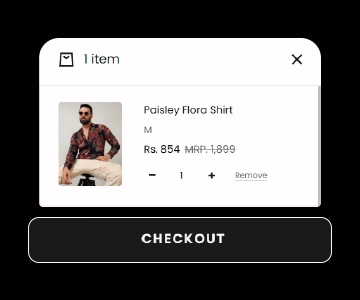
Add items to your cart and proceed to checkout.
Step 3
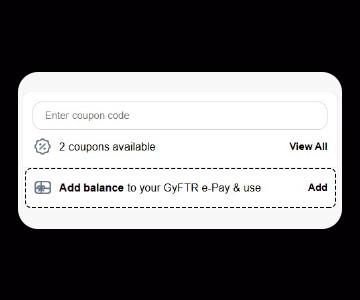
Select "Pay via e-pay/ Gift Vouchers" option. You can add vouchers to your e-Pay balance, and your balance will be shown.

Company Name : Sarvpay Online Private Limited
.
Quick Read
Easy Guide
© 2025 copyright. All rights reserved.